

A reviews snippet looks harmless in a ticket: a mount node, a short script tag, a promise that social proof will appear under the hero. Paste it on staging, refresh once, ship. Weeks later the homepage shows a blank gray box for half of Europe, last month’s rating after a reputation spike, or a layout jump that knocks the primary button out from under someone’s thumb.
Those are not mysterious “third-party vibes.” They are predictable production failure modes. Teams that embed a Google reviews widget without treating the paste as a live dependency inherit them. This article is a spine through the ones that show up most often: script footprint, caching mismatches, and the concrete ways an embed goes quiet, stale, or hostile to the rest of the page.
It is not a tour of display methods. It is not a performance pep talk framed as “show reviews without slowing anything down.” It is what breaks when you paste carefully—or when you do not.
The careless paste, rewritten as an integration
Marketing owns the widget config. Engineering owns the template. Neither owns the remote host, the consent category, or the edge TTL on the HTML shell. That split is why “it worked in the preview” fails in production.
A careless paste usually means one or more of these shortcuts:
- Snippet dropped into the theme header and into a page-builder block “so it is easy to find.”
- Script left as a classic blocking tag in <head> because that is how the vendor’s copy-paste example looked five years ago.
- No reserved height on the mount node because “the widget sizes itself.”
- CSP and consent left for “later,” which becomes never until a security review hardens headers.
- Full-page cache treating the reviews slot like static brochure copy.
Each shortcut maps to a failure class below. Fix the class, not the symptom screenshot.
Script footprint: main thread, duplicates, and every page you forgot
An embed is not one network request. It is a loader, often a follow-on bundle, review payload fetches, fonts or icons, and sometimes impression beacons. The bytes matter. The main-thread work and connection contention matter more when the slot sits near the first screen.
What the footprint actually includes
Inventory it like any other third party:
- Loader script from the vendor origin.
- Secondary JavaScript that builds the UI.
- Data requests (live, cached snapshot, or both).
- Images for avatars or badges.
- Optional analytics tied to views and clicks.
If you cannot list those origins, you cannot write a Content Security Policy, a consent category, or a monitoring rule. Start there before arguing about design presets.
Async, defer, and accidental parser work
MDN’s documentation on async and defer is the baseline for how classic scripts interact with parsing and DOMContentLoaded. A reviews loader that blocks the parser waits on a third-party round trip before the rest of the document continues. A loader with async may run before the mount node exists. A deferred script usually waits for the document to parse, which is often what a mount-node widget needs.
Careless patterns:
- Blocking <script src=”…”> in <head> with no async or defer.
- Inline bootstraps that immediately write or mutate the DOM before the placeholder exists.
- “Latest” URLs with no pin, so a vendor release changes main-thread cost overnight without a deploy on your side.
Choose a loading strategy on purpose. Document it next to the snippet. Revisit it when the widget gains a carousel, autoplay, or heavier animation presets.
Duplicate tags across templates and tag managers
Duplicate injection is a footprint failure that looks like a mysterious flicker:
- Two requests for the same loader.
- Console noise about a global already defined.
- Mount, tear-down, remount.
- Inflated impression counts if the vendor meters each init.
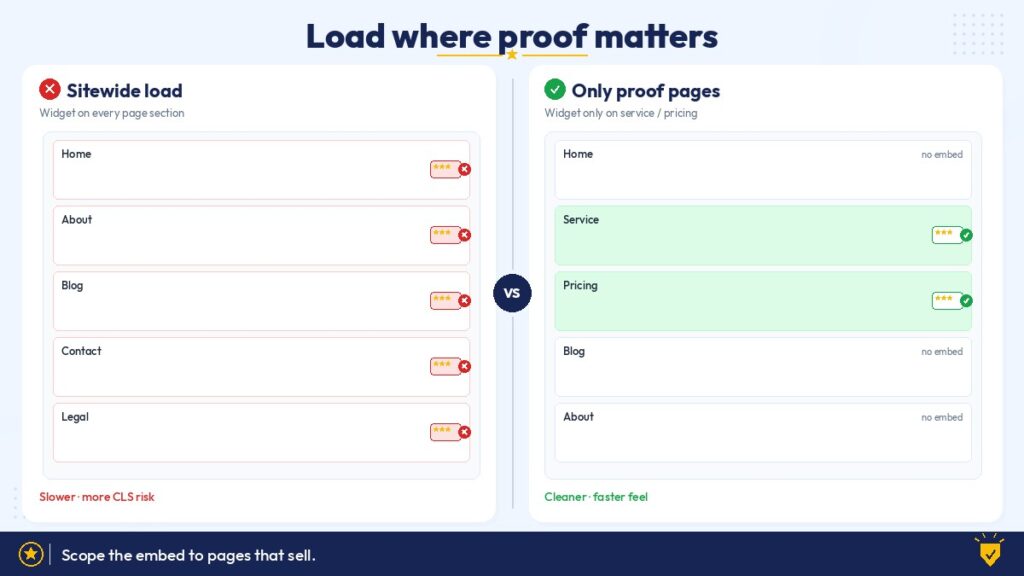
Hunt across theme headers, footers, CMS shortcodes, page builders, and Google Tag Manager. Keep one authorized injection path. When multiple pages need the widget, share one loader and multiple mount nodes—do not paste the full snippet on every template and hope the browser dedupes.
Multi-page sprawl
Homepages get the careful review. Service landing pages get a rushed duplicate. Blog sidebars get a third copy “for consistency.” Each copy is another chance for an old account ID, an outdated host, or a second loader. Centralize the partial or component. Treat regenerated vendor markup as a single source of truth that templates include, not ten independent pastes.
Caching: stale stars, edge TTL, and browser cache vs sync
Reviews are trust. Serving a 3.9 when Google already shows 4.8 is a product bug dressed as a cache miss. Hitting live upstreams on every anonymous page view is the opposite extreme: fragile, rate-limit-prone, and unnecessary for most brochure sites.
You need an explicit policy for four layers:
- HTML shell at the CDN or full-page cache.
- Widget assets (JS/CSS) at the browser and vendor CDN.
- Review payload (JSON or rendered fragment) and its refresh interval.
- Your own sync job, if you snapshot server-side.
Stale reviews after a reputation change
Failure mode: a campaign or crisis moves the live Google rating; the site lags for days. Sales hears “your site is wrong” from people who checked the listing. The embed did not “fail”—the freshness contract was never written.
Mitigations:
- Know the vendor’s documented refresh window; do not invent one.
- Avoid long-lived full-page caches of HTML that inlines a frozen review snapshot unless you have a purge hook.
- Spot-check production after you know Google Business Profile changed—not only after deploys.
- If marketing needs near-real-time quotes, say so in the architecture; default edge TTLs will not invent that for you.
Edge TTL and HTML that outlives the snippet
CDNs love stable HTML. Embeds often need fresher data or a late-bound script URL. Production quirks:
- Cached HTML still points at a retired loader host after a vendor migration.
- One PoP purged; another serves last week’s shell.
- Consent or A/B variants cached together so some visitors get a mount node without a loader, or a loader without a node.
- “Optimize” layers rewriting third-party URLs and breaking integrity or absolute paths.
After snippet changes, purge the templates that include them. Verify cold and warm cache. Log failed loads for the widget origin if you have RUM or edge logs.
Browser cache vs sync reality
Browsers cache script files aggressively when headers allow it. That is usually good for assets and bad when you expected a config change to appear instantly. Sync of review data is a separate clock from cache of JavaScript. Confusing the two produces support tickets like “we updated the widget in the dashboard and nothing changed,” when the dashboard updated the data pipeline and the visitor’s browser still holds yesterday’s loader—or the edge still holds yesterday’s HTML.
Teach the team which lever to pull: hard refresh for asset suspicion, purge for HTML suspicion, vendor refresh docs for payload suspicion.

Failure modes that look like “the widget is broken”
CSP blank box
Content Security Policy is where paste-and-pray dies silently. Staging may run loose or empty headers. Production adds script-src, connect-src, img-src, font-src, and frame-src. The loader, XHR endpoints, avatars, and any iframe each need a matching allowlist entry.
Symptoms: empty slot, console CSP violations, partial chrome without text, “works on my laptop” because an internal build disabled enforcing CSP.
Before go-live, inventory origins, add the minimum entries, and know whether you are in report-only or enforcing mode. Bring security the vendor domain list early so the policy does not get permanently widened with *.
Consent-manager blocking
A consent management platform that gates marketing or third-party tags will withhold the reviews script until opt-in. That is the CMP working. The product failure is a hollow rectangle for visitors who reject non-essential cookies, sometimes with height reserved for a widget that never initializes.
Design for the rejected-all path: static rating summary, link out to the Google profile, or a first-party snapshot. Decide the legal category with compliance, not with “most users accept.” Retest preference changes so the CMP does not double-inject the loader.
CLS near a CTA
Cumulative Layout Shift near high-intent UI is a conversion failure as much as a metrics failure. Google’s Core Web Vitals guidance treats visual stability as a first-class signal. A reviews block that expands from zero height beside “Get a quote” or “Book now” trains people to miss-tap.
Typical causes: no min-height on the mount node, late fonts inside the widget, carousels that grow when images arrive, and mobile stacking that was never tested under throttle.
Reserve space that matches the configured size at your real breakpoints. Prefer capped card counts. Re-check when marketing switches from a compact badge to a multi-review carousel. You do not need a fabricated Lighthouse screenshot—you need eyes on the CTA while the slot paints on a slow connection.
Vendor host change
Vendors rename CDNs, migrate accounts, and deprecate embed endpoints. Your paste is a contract with a host you do not operate.
Watch for: hard-coded hosts across ten landing pages, old account IDs after a dashboard rebuild, protocol-relative URLs that misbehave after an HTTPS redirect change, and Subresource Integrity hashes that were correct last quarter and fail after a vendor deploy.
Centralize the snippet. Name an owner. After migration emails, purge and re-verify production—not “next sprint.”
Iframe vs script
Script embeds mutate your page and share the browsing context’s CSP, consent hooks, and main thread more directly. Iframes add a nested browsing context: different sizing rules, frame-src instead of (or in addition to) script-src, scroll and resize quirks, and a harder path for your CSS to influence internals.
Failure modes unique to the wrong choice for your stack:
- Script assumed, but CSP only allowlisted frames—or the reverse.
- Fixed iframe height clipping reviews on mobile while desktop looks fine.
- Cross-frame resize messages blocked, so the iframe never grows with content.
- Double scrollbars inside a card layout.
Pick the embedding mode the vendor documents for your use case, then align CSP, sizing, and QA to that mode. Do not swap iframe and script mid-campaign without a layout pass.
Offline, flaky networks, and ad blockers
Third-party hosts disappear for users on airplanes, captive portals, corporate filters, and aggressive ad blockers that treat “widget” and “review” URLs as trackers. The failure is an empty or broken slot with no first-party explanation.
Defensive patterns: a visible fallback rating string in first-party HTML, a link to the public Google listing, and CSS that does not leave a huge empty hole when the iframe or script never arrives. Do not pretend every visitor can reach the vendor origin.
Race with hydration
On React, Vue, SvelteKit, Next, Nuxt, and similar stacks, the server renders a placeholder; the client hydrates; a third-party script also tries to own the same DOM node. Races look like:
- Widget mounts, hydration replaces the node, widget vanishes.
- Hydration warnings about mismatched markup because the embed injected nodes before the framework claimed the tree.
- Effects that run twice in development Strict Mode and init the vendor SDK twice.
Install patterns that usually behave better: mount into a client-only island, wait for hydration to finish before calling the vendor init, or render a stable empty container whose children the framework promises not to reconcile. Test a hard refresh and a client-side navigation to the same page—those paths often diverge.
How to install and test defensively
Treat the embed like a small third-party integration with a go-live gate.
Install
- Put the snippet in one partial, component, or tag-manager template—nowhere else.
- Confirm loading attributes (async / defer / vendor loader pattern) against DOM readiness needs.
- Set explicit width/min-height on the mount container for desktop and mobile configs.
- Allowlist only the required origins in enforcing CSP.
- Map the tag to the correct CMP category and define the opt-out fallback.
- Record owner, vendor account, billing contact (PayPal or invoice—keep renewals attached to a human), and where the canonical config lives.
Test matrix (minimum)
- Cold cache and warm cache on production-like CDN settings.
- Accept-all and reject-all consent paths.
- Throttled mobile with the CTA visible while the widget paints.
- Hard refresh and in-app client navigation (for SPAs/SSR hybrids).
- Ad-blocked or offline simulation for the fallback.
- Console clean of CSP violations and duplicate-init errors.
- Spot-check after a known Google Business Profile change and after any vendor migration notice.
Incident taxonomy
| Symptom | Likely class | First checks |
| Empty box, CSP errors | Policy | script-src / connect-src / img-src / frame-src |
| Empty box, consent UI, no CSP noise | Consent | CMP category, reject-all fallback |
| Wrong rating or old quotes | Cache / sync | Edge HTML TTL, vendor refresh, payload vs asset cache |
| Script or frame 404 | Host / snippet drift | Loader URL, purge, regenerated embed |
| Flicker, double network | Duplicate load | Theme + GTM + builder |
| CTA jumps | Layout / CLS | min-height, widget size, fonts, carousel |
| Works on SSR HTML, dies after nav | Hydration / SPA | Client island, init timing |
| Empty for some networks only | Block / offline | Adblock, corporate filter, fallback copy |
What careful looks like when you are done
Careful is a short recorded set of decisions:
- One injection path and an intentional script loading strategy.
- A freshness policy that distinguishes HTML cache, asset cache, and review sync.
- Layout reservations so social proof cannot shove the conversion path.
- CSP and consent behavior—including what opted-out and blocked users see.
- A named owner when the vendor host or marketing config changes.
Do that, and a Google reviews embed stays durable social proof under real production constraints. Skip it, and you collect partial outages that are easy to dismiss until a prospect sends your blank box—or your stale stars—back to sales.
Paste carefully. The snippet is small. The failure surface is not.