

Which content marketing tools save time? The biggest time savers are project management apps, AI writing assistants, design templates, scheduling platforms, and automation tools. Each one removes a repetitive task from your week.
Content marketing takes many steps. You plan, research, write, design, publish, promote, and report. Doing all of it by hand drains your team fast.
The right tools cut wasted hours without hurting quality. This guide covers the most useful options in each category. You will also learn how to choose tools that fit your workflow.
Project Management Tools Cut Planning Time
Project management tools save time by putting every task, deadline, and file in one place. Your team stops chasing updates through email and chat.
Popular options include Trello, Asana, Notion, and ClickUp. Each one lets you build a content calendar and assign tasks. You can also track each piece from idea to publication.
Use Templates for Repeat Tasks
Templates save time because you never rebuild the same process twice. Create one template for blog posts and another for email campaigns. Each template can include a checklist for drafting, editing, design, and approval.
For example, a small agency can set up a “New Blog Post” card in Trello. The card holds the brief, keyword, due dates, and review steps. A new writer can start work without a long onboarding call.
Keep Feedback in One Place
Centralized feedback prevents endless email chains. Tools like Asana and Notion let reviewers comment directly on tasks or documents. As a result, writers see every change request in one spot.
Writing and Editing Tools Speed Up Drafts
Writing tools save time by helping you draft faster and fix errors sooner. They do not replace your expertise, but they remove much of the busywork.
AI Writing Assistants
AI assistants save time on outlines, first drafts, headline ideas, and content repurposing. You can ask one to turn a webinar transcript into a blog outline. You can also ask it to suggest ten subject lines for an email.
Always review the output. AI tools can make factual mistakes. Check every claim, add your own examples, and match your brand voice before you publish.
Grammar and Style Checkers
Grammar tools such as Grammarly and Hemingway Editor catch mistakes in seconds. They flag long sentences, passive voice, and spelling errors. This shortens the editing round and keeps your writing clear.
If you publish on WordPress, the Yoast SEO plugin adds another layer. It checks readability and on-page SEO while you write. That saves you from a separate review later.
SEO and Research Tools Shorten Topic Research
SEO and research tools save time by showing you what your audience searches for. You skip guesswork and pick topics with real demand.
Semrush and Ahrefs help you find keywords, study competitors, and spot content gaps. Google Search Console is free. It shows which queries already bring visitors to your site. You can then update pages that almost rank well.
AnswerThePublic and similar tools turn a single keyword into a list of real questions. Those questions make excellent subheadings and FAQ sections.
Content optimization tools like Surfer SEO and Clearscope compare your draft against top-ranking pages. They suggest related terms and headings. This gives you a clear checklist instead of hours of manual analysis.
Feedly can also help. It collects industry news and blogs into one feed. You can scan trends in ten minutes instead of visiting many sites.
Accelerating Visual Content Creation with Smart Design and Video Platforms
Design and video creation tools eliminate time-consuming bottlenecks by providing professionally crafted templates, allowing marketing teams to launch social graphics and blog visuals swiftly without requiring a dedicated design team for every asset. Industry standards like Canva simplify visual output through centralized brand kits that lock in custom color palettes, typography, and logos, guaranteeing seamless visual consistency across every project. Similarly, Adobe Express delivers robust template workflows tailored for teams integrated into the broader Adobe ecosystem. However, before deploying automated visual tools, establishing a clear strategic roadmap is essential explore our guide on build a content marketing plan step-by-step to ensure your design stack directly supports your broader business goals.
Video and Audio Editing
Video takes more time than most formats. Descript makes it easier by letting you edit video and audio like a text document. Delete a sentence in the transcript, and the tool removes it from the recording.
Loom is another time saver. You can record your screen and voice in minutes. It works well for tutorials, client updates, and quick explainer videos.
Scheduling Tools Save Time on Publishing and Promotion
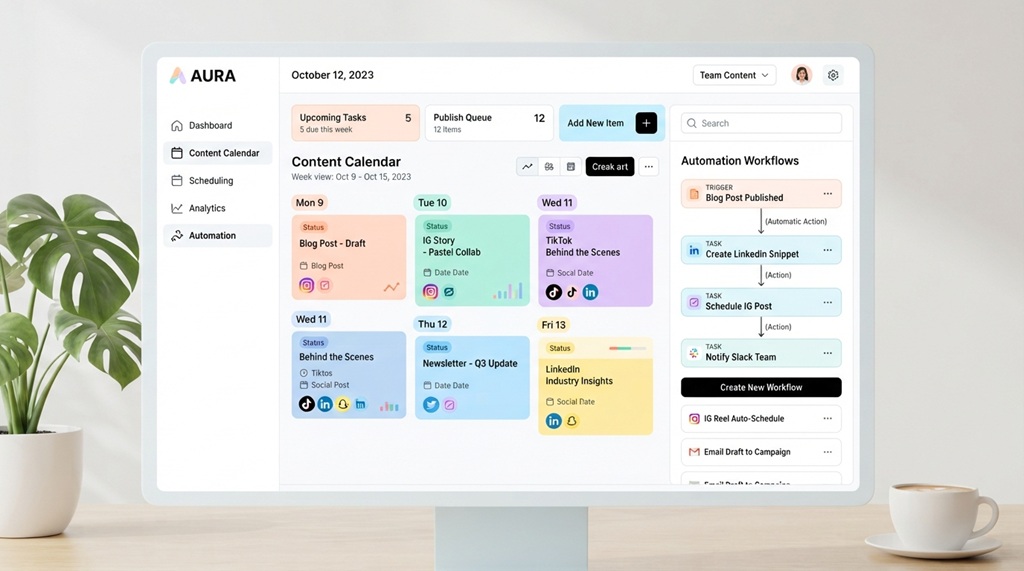
Scheduling tools save time by letting you publish many posts at once. You plan your social media for the week in one sitting.
Buffer, Hootsuite, and Later let you queue posts across several platforms. You can adjust each post for the platform. Then you can preview how it will look before it goes live.
Email platforms work the same way. Mailchimp, HubSpot, and similar tools let you schedule campaigns and build automated sequences. A welcome series, for example, can run without any manual work after you set it up.
Batching also helps. Write a week of posts in one session, and you avoid daily context switching. Your scheduling tool then handles the rest.
Automation and Analytics Tools Remove Manual Work
Automation tools save time by connecting your apps and moving data between them. Zapier and Make are two well-known options. They run simple “if this, then that” workflows without code.
Here are a few practical examples:
- Send a Slack message when a new blog post goes live.
- Add new form leads to your email list automatically.
- Create a task in Trello when a topic gets approved.
- Save social media mentions to a spreadsheet.
Each automation may only save a few minutes. However, those minutes add up over a month.
Faster Reporting
Reporting often eats up a whole afternoon. Looker Studio, a free Google tool, can connect to Google Analytics and Search Console. It builds live dashboards that update on their own. You share one link instead of assembling a monthly report by hand.
Google Analytics 4 also shows which content drives traffic and conversions. Use it to decide what to update, repeat, or drop.
How to Choose the Right Content Marketing Tool
Choose a tool by starting with your biggest time drain. Fix that problem first, and skip tools that solve problems you do not have.
Follow these simple steps:
- List your slowest tasks. Track where your team loses the most hours.
- Pick one tool per problem. Avoid buying several tools with overlapping features.
- Start with free trials. Test each tool on a real project before you commit.
- Check integrations. The tool should work with your CMS, email platform, and analytics.
- Train your team. A tool only saves time if people actually use it.
Also, review your stack every few months. Cancel tools nobody uses. A smaller toolkit that your team knows well beats a crowded one.
Frequently Asked Questions
What is the best content marketing tool for beginners?
Canva and Trello are easy places to start. Canva handles design without a learning curve. Trello helps you organize your content calendar in a simple visual board. Both have free plans, so you can test them without risk.
Can AI tools replace content writers?
No. AI tools speed up outlines, drafts, and editing, but they still need human review. Writers add expertise, original examples, and brand voice. They also check facts, which AI tools can get wrong.
How many content marketing tools do I really need?
Most small teams do well with four to six tools. A typical set includes a project manager, a writing assistant, an SEO tool, a design tool, and a scheduler. Add more only when a clear need appears.
Are free content marketing tools good enough?
Yes, many free tools work well for small teams. Google Search Console, Looker Studio, and free plans from Canva and Trello cover a lot of ground. Upgrade only when you hit a limit that slows you down.
How do I know if a tool is actually saving time?
Track how long a task takes before and after you use the tool. For example, time how long you spend on monthly reports. If the number does not drop after a few weeks, the tool may not fit your workflow.
Conclusion
Content marketing tools save time when they match your workflow. Project management apps organize the work. Writing and SEO tools speed up research and drafts. Design, scheduling, and automation tools handle the repetitive parts.
Your next step is simple. Find the one task that costs your team the most hours this week. Pick a tool that fixes it, test it on one project, and measure the result. Then build your toolkit one step at a time.